
Building the Brains - Day 2: Intro to Computer Architecture - Part 1

Day 2 of Infineon's Embedded Systems course took us into the bedrock of our field: Computer Architecture. Ananth Kamath guided us through systems, real-time processing, and the classic Von Neumann vs. Harvard debate.
After a fantastic kickoff, Day 2 zoomed out to give us the big picture—the very foundation upon which all software runs: Computer Architecture. Our instructor for this fundamental topic, Ananth Kamath, masterfully broke down the complex world of CPUs and systems into digestible, core concepts.
It All Starts with a System
Before diving deep, we started with a simple, powerful generalization that applies to everything: Input -> Processing -> Output.
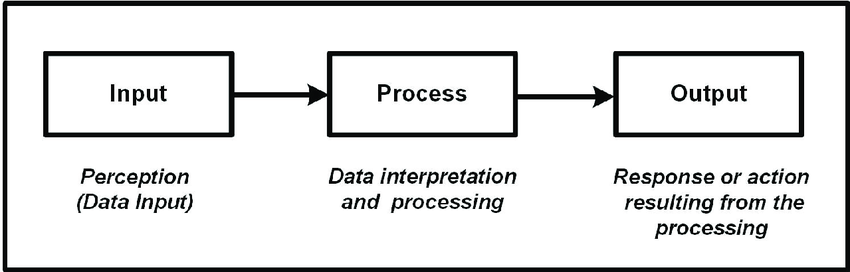
Figure 1: The fundamental model of any computing system.
This basic model scales up beautifully. We moved from simple examples to complex Multiple Input Multiple Output (MIMO) systems. A modern smartphone is a perfect example: it takes inputs from a touchscreen, microphone, camera, GPS, and sensors, processes that data, and produces outputs on an LCD screen, speakers, and haptic motors—all at the same time!
Embedded vs. General-Purpose Systems
A key takeaway was the difference between an embedded system and a general-purpose one. A general-purpose computer (like a laptop) is a jack-of-all-trades, designed to run a variety of applications. An embedded system, however, is a specialist, designed for a specific task. Think of it as a custom tool built for one job, like the controller in your washing machine or the anti-lock braking system in a car. It's highly optimized for its purpose, focusing on factors like cost, power consumption, and reliability over raw performance.
From a Crowded Board to a Single Chip: The Evolution
Ananth sir took us on a trip back in time to the 1970s. Back then, an embedded system was a collection of separate chips on a circuit board: a CPU, memory chips, and various peripheral controllers.
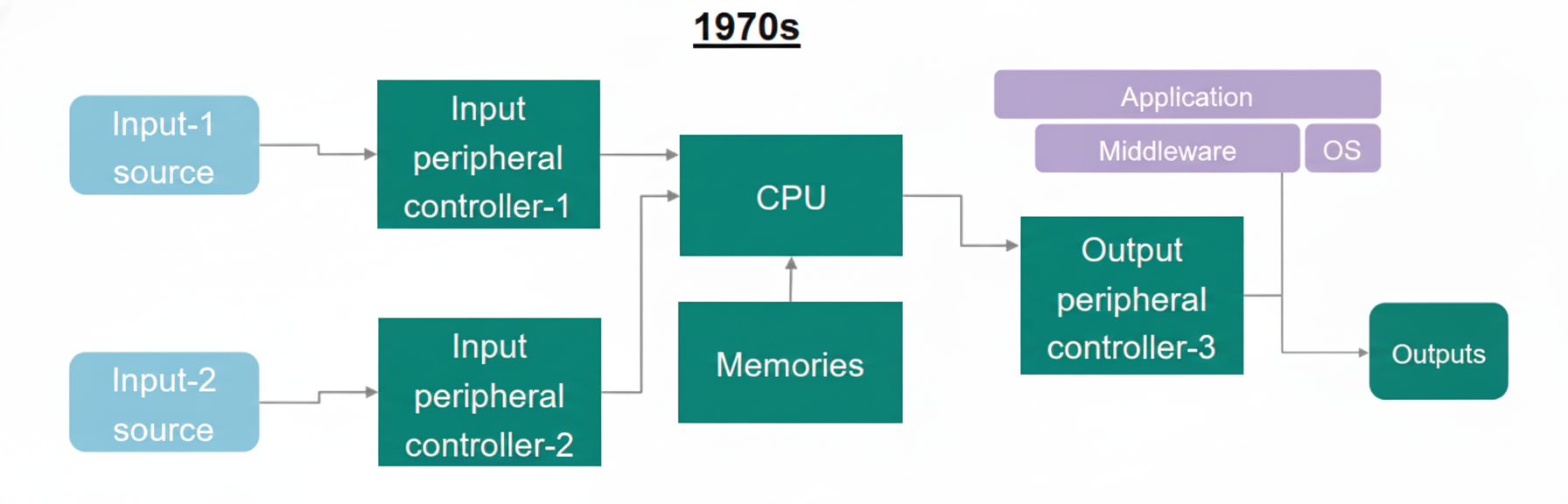
Figure 2: Embedded System during the 1970s.
Fast forward to today, and we have the System-on-Chip (SoC). Thanks to massive integration, all those separate components are now packed onto a single piece of silicon. This evolution has made embedded systems smaller, faster, cheaper, and far more powerful.
Figure 3: Embedded System as a single board computer.
The Software Stack: Bare Metal vs. OS
Hardware is only half the story. We then explored the software that brings it to life, looking at two primary approaches:
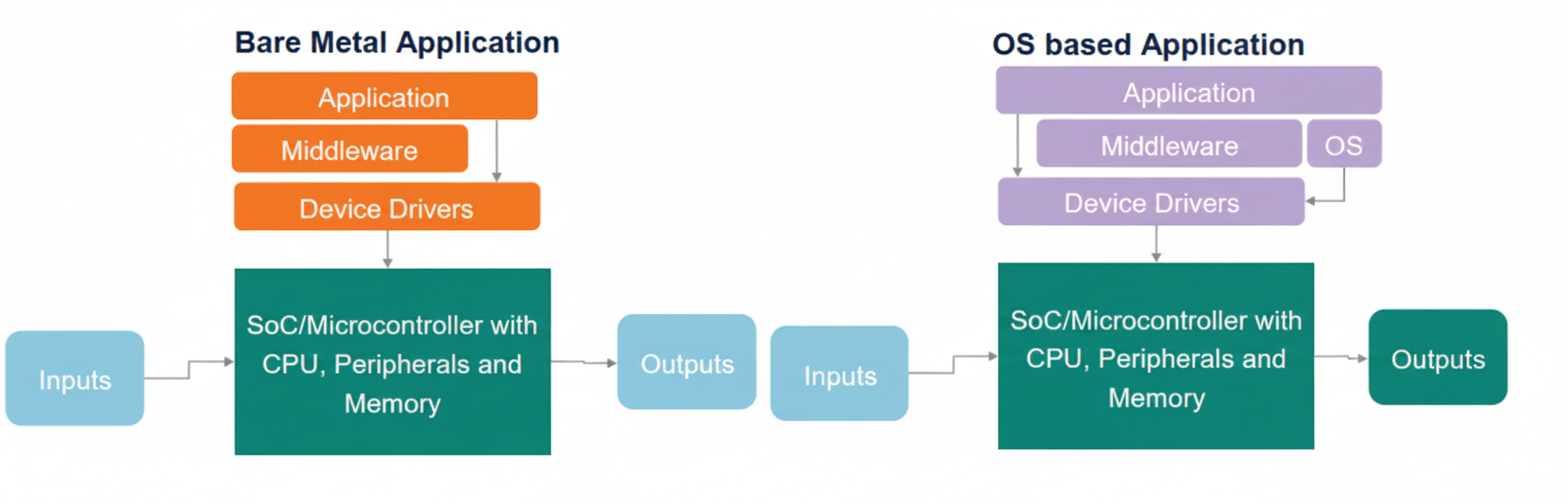
Figure 4: Bare Metal Application vs OS-based Application
-
Bare Metal Application: This is the most direct approach. Your code runs directly on the hardware with no operating system in between. It gives you maximum control and performance but requires you to manage everything yourself.
-
OS-based Application: Here, an Operating System (often a Real-Time OS or RTOS) sits between your application and the hardware. The OS's primary job is to manage resources and handle task scheduling, allowing multiple processes to run concurrently.
In both stacks, a middleware layer often exists. It's a software layer that provides common services, like a communication protocol stack (e.g., TCP/IP) or a file system, saving developers from reinventing the wheel.
Masters and Slaves of the Bus
Inside a microcontroller, various components need to talk to each other. They do this over a communication pathway called a bus. The roles are clearly defined:
But how does a master know where to find a slave? The answer lies in the Memory-Mapped I/O (MMIO) scheme, which is the standard for all modern CPUs.
Imagine the entire system's addressable space as one giant street. Both memory locations (houses) and peripherals (shops) reside on this same street, each with a unique address. The CPU, acting like a mail carrier, doesn't need to know whether it's delivering data to a house or a shop; it just needs the address.
This means the CPU uses the exact same instructions (like load and store) to communicate with both memory and peripherals. The total address space (e.g., 4GB for a 32-bit CPU) is simply partitioned, with specific address ranges assigned to RAM, Flash, GPIO ports, UARTs, and everything else.
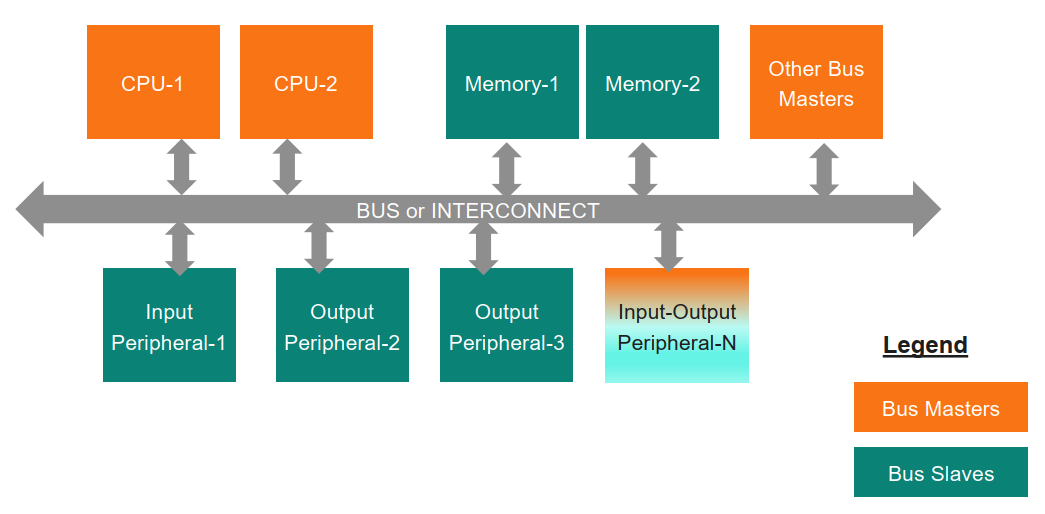
Figure 5: A typical Microcontroller
- A Bus Master is a component that can initiate a data transfer. The CPU is the most common example.
- A Bus Slave is a component that responds to a master's request. Memory, timers, and GPIO ports are typical slaves.
Interestingly, some components can be both! A Direct Memory Access (DMA) controller is a great example. It can act as a master to transfer data directly between a peripheral and memory, freeing up the CPU to do other tasks.
Architecting the Core: Von Neumann vs. Harvard
Finally, we journeyed into the heart of the processor itself to look at two seminal CPU architectures.
-
Von Neumann Architecture: This design uses a single, shared memory space for both program instructions and data. While flexible, this creates a traffic jam known as the "Von Neumann Bottleneck," as the CPU can't fetch instructions and access data simultaneously.
-
Harvard Architecture: This design cleverly removes the bottleneck by creating separate memory spaces and buses for instructions and data. This allows for parallel access, boosting performance significantly.
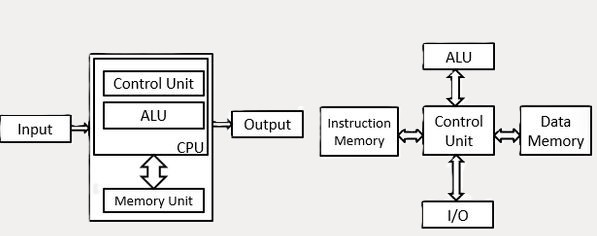
Figure 6: Visualizing the Von Neumann (left) bottleneck and how the Harvard architecture (right) provides a solution.
So, What Kind of CPU is It?
The session concluded by demystifying CPU types. Ananth sir explained that the "type" of a CPU (e.g., 8-bit, 16-bit, 32-bit) is fundamentally determined by the width of its internal registers and the size of the data its Arithmetic Logic Unit (ALU) can process in a single operation. A 32-bit CPU has 32-bit registers and an ALU designed to work on 32-bit numbers. Simple as that!
Day 2 was packed with foundational knowledge, giving us a solid blueprint of the hardware we'll be commanding with our code. The session perfectly set the stage for understanding exactly what happens "under the hood."
#Infineon #EmbeddedSystems #Cohort3 #ComputerArchitecture #SoC #BareMetal #RTOS #CPU #VonNeumann #RealTimeSystems