
The Construction Manager - Day 6: Automating Chaos with Makefiles

Day 6 of the Infineon course tackled a developer's nightmare: managing complex source trees. Guided by Boya Vinay Kumar, we learned to implement Hierarchical Makefiles to automate our build process.

After creating our "Master Blueprint" with the Linker Script on Day 5, we hit a practical wall on Day 6. We know how to compile a file and where to put it in memory, but doing this manually for a massive project is error-prone and tedious.
Imagine managing a project with dozens of source files scattered across different folders. Typing compilation commands for every single one? No thanks.
Enter Boya Vinay Kumar and the topic of the day: Makefiles. If the Linker Script is the architect's blueprint, the Makefile is the site manager who ensures every brick is laid in the right order, efficiently and automatically.
The "Make" Philosophy
The core motivation behind Makefiles is build automation. Instead of manually invoking the compiler for every file, we define:
- Dependencies: Which files rely on which (e.g.,
main.odepends onmain.c). - Rules: How to create the target from the dependency (e.g., the
gcccommand).
The make tool is smart. It checks timestamps; if a source file hasn't changed, it won't waste time recompiling it.
Our Project Structure
To understand this in practice, we set up a modular project structure. Instead of dumping everything into one folder, we organized our code logically:
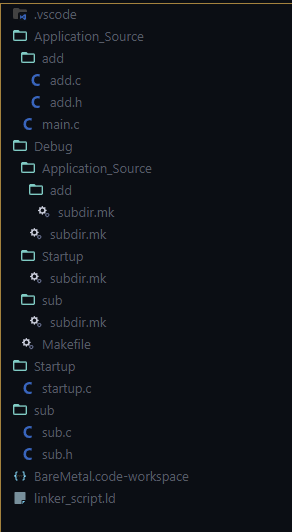
Figure 1: Our organized project structure, separating application logic, math functions, and startup code.
Application_Source/: Contains ourmain.cand a sub-folderadd/for addition logic.sub/: A sibling folder containing subtraction logic (sub.c,sub.h).Startup/: Contains the system startup code (which we will explore in later classes).Debug/: The destination for our compiled object files (.o) and the final executable.
The Source Code
We established dependencies between these files using header includes. In main.c, we include headers from different locations using relative paths to jump between directories.
#include <stdint.h>
#include "add/add.h"
#include "../sub/sub.h"

uint8_t app_heap[512] __attribute__((section (".heap")));
uint8_t app_stack[1024] __attribute__((section (".stack")));

int main_counter = 0;

void main(void) {
    int sum = add_func(10, 20);
    int diff = sub_func(sum, 5);

    while(1) {
        main_counter++;
    }
}
This creates a dependency chain: to build the main object file, the compiler needs to be able to resolve these specific header paths.
Divide and Conquer: Hierarchical Makefiles
For a project this structured, a single massive Makefile can get messy. We used a Hierarchical Makefile approach.
The idea is simple: Parent-Child Logic.
- Child Makefiles (
subdir.mk): Each source folder has a small snippet file that knows how to compile only the files in that specific folder. - Root Makefile: The boss. It imports all the children and links everything together.
The Child: subdir.mk
Let's look at the subdir.mk for the add folder. It performs three specific tasks:
- Register Source Files: It adds its
.cfile to a global variable list of source files (C_SRCS). - Register Object Files: It adds the expected
.ofile to a global variable list of object files (OBJS). - Define the Build Rule: This is the most critical part. It tells
makeexactly how to turn a.cfile in this specific folder into a.ofile.
C_SRCS += \
../Application_Source/add/add.c

OBJS += \
./Application_Source/add/add.o

Application_Source/add/%.o: ../Application_Source/add/%.c
	@echo 'Building file: $^'
	@echo 'Invoking: ARM-GCC C Compiler'
	$(CC) $(CFLAGS) -c -o $@ $^
	@echo 'Finished building: $^'
In the rule above:
$@: Represents the target (the.ofile).$^: Represents the input (the.cfile).$(CC)and$(CFLAGS): These variables use the compiler and flags that are defined in the main Makefile.
We have similar subdir.mk files for Application_Source, sub, and Startup. Each contributes its own piece to the puzzle.
The Parent: The Main Makefile
The Main Makefile sits at the root and orchestrates the entire show.
1. Configuration and Flags
First, we define our tools and flags. We are using arm-none-eabi-gcc.
DFLAGS: We set device-specific flags like-mcpu=cortex-m0plusbecause code compiled for a different architecture won't run on our board .CFLAGS: These are the general compiler flags, where we set things like debugging info (-g) and optimization levels (-O0) .LFLAGS: These are the linker flags. This is where we attach our Linker Script (-T linker_script.ld) and standard libraries .
CC = arm-none-eabi-gcc
DFLAGS = -mcpu=cortex-m0plus -mthumb -msoft-float
CFLAGS = $(DFLAGS) -g -c -Wall -Wextra -std=gnu11 -O0
LD = arm-none-eabi-gcc
LSCRIPT = ./../linker_script.ld
LFLAGS = $(DFLAGS) -T $(LSCRIPT) -nostartfiles --specs=nano.specs -specs=nosys.specs -Wl,-Map=$(MAP) -Wl,--gc-sections
2. Importing the Children
This is where the hierarchy comes together. We use the -include directive to pull in all the snippets we wrote earlier.
-include ./Application_Source/subdir.mk
-include ./Application_Source/add/subdir.mk
-include ./sub/subdir.mk
-include ./Startup/subdir.mk
After these lines run, our OBJS variable contains a list of every object file needed for the project!
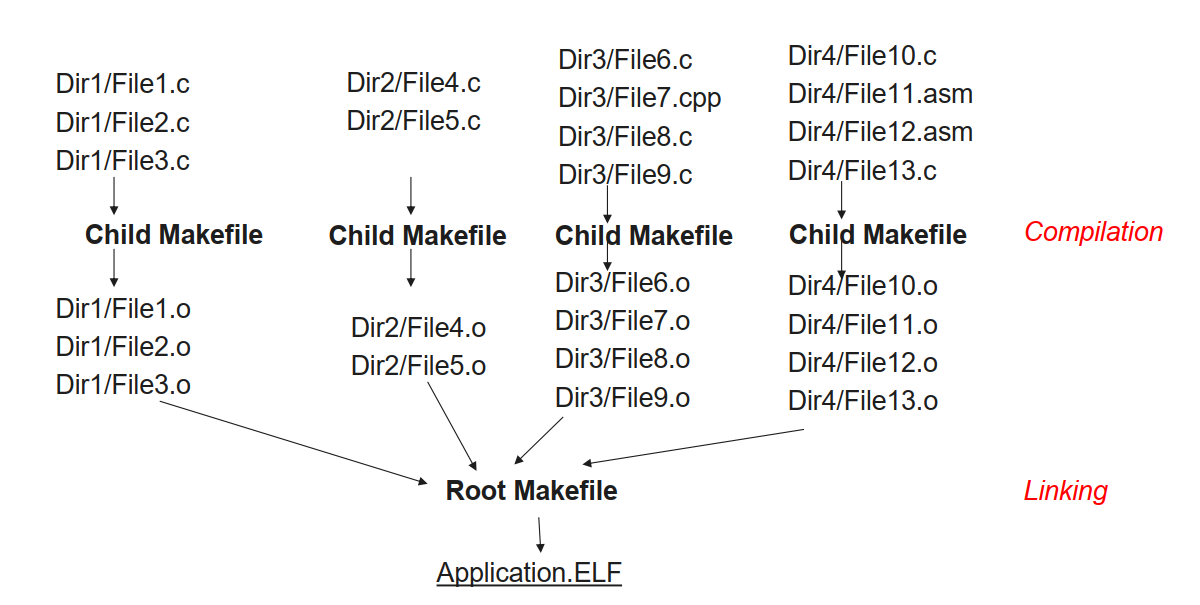
Figure 2: The Main Makefile acts as a hub, aggregating sources from all sub-directories.
3. The Phony Targets
We learned about "Phony" targets—commands that don't represent actual files but rather actions we want to perform .
make all: This is the default target. It demands the creation of the final binaries, including the hex file, the listing file (.lst), and the size report (.siz) .make clean: This is for housekeeping. It forcibly removes (rm -rf) all generated artifacts—the object files ($(OBJS)), the executable ($(ELF)), and the map file ($(MAP)), leaving the project fresh .make tidy: A lighter version of clean that only removes the intermediate object files ($(OBJS)), keeping the final executable intact .
.PHONY: all clean tidy

all: $(HEX) $(LST) $(SIZ)

clean:
	rm -rf $(OBJS) $(HEX) $(ELF) $(LST) $(MAP)
	@echo 'Cleaning Completed'

tidy:
	rm -rf $(OBJS)
4. The Final Link
Finally, the rule to create the ELF file ties everything together. It takes all the objects collected from the sub-directories ($(OBJS)) and hands them to the linker using the linker flags ($(LFLAGS)) .
$(ELF): $(OBJS)
    @echo 'Building target: $@'
    $(LD) $(LFLAGS) $(OBJS) -o $(ELF)
    @echo 'Finished building target: $@'
By running a simple make all command in our terminal, this cascade of rules triggers, compiling every file in the correct order and linking them into a binary ready for our PSoC 4.
Day 6 showed us that while we can build everything manually, a robust build system is the backbone of any serious embedded project.
#Infineon #EmbeddedSystems #Cohort3 #Makefiles #BuildAutomation #GCC #DevOps #EmbeddedSoftware