
Debugging Mastery & The Art of Interrupts - Day 8: Interrupts and Exceptions - Part 1

Day 8 of the Infineon Embedded Systems Course was a mix of practical debugging with OpenOCD and a deep theoretical dive into the Cortex-M0+ interrupt architecture. We explored how the CPU handles asynchronous events, manages stacks, and prioritizes critical tasks.

After a well-deserved break on November 1st for Kannada Rajyotsava, we returned to the Infineon campus on Saturday, November 8th, 2025, with renewed energy. The day was a perfect blend of hands-on practice and intense theory, guided by Siddhesh Raut and Prakash Balasubramanian.
Part 1: Hands-on Debugging with OpenOCD
The morning session was dedicated to mastering the tools we set up in the previous classes. We started with a recap of OpenOCD (Open On-Chip Debugger), the bridge that connects our PC to the PSoC microcontroller.
We took our PSoC 4100S Plus boards and programmed them with the BareMetal V1 project. But we didn't just flash the code and hope for the best. We learned to debug.
Using the debugger, we stepped through the code line-by-line, watching how the processor moved from the startup code to main(). We explored variables in memory, checked register values, and essentially "looked under the hood" while the engine was running. This practical exploration gave us a tangible feel for the concepts we had only discussed theoretically before.
Part 2: The Theory of Interrupts
In the afternoon, Siddhesh Raut took the stage to introduce one of the most critical concepts in embedded systems: Interrupts.
The Event-Driven World
Embedded systems are fundamentally Event-Driven. Unlike a simple script that runs from top to bottom, an embedded system must respond to the outside world. Events are asynchronous—they can happen at any time, unrelated to the main program flow.
We compared two ways to handle these events:
- Polling: The CPU constantly asks, "Are you ready? Are you ready?" This wastes massive amounts of CPU power and time.
- Interrupts: The CPU works on its main task. When an event occurs (like a button press), the peripheral "interrupts" the CPU, which pauses its work, handles the event, and then resumes.
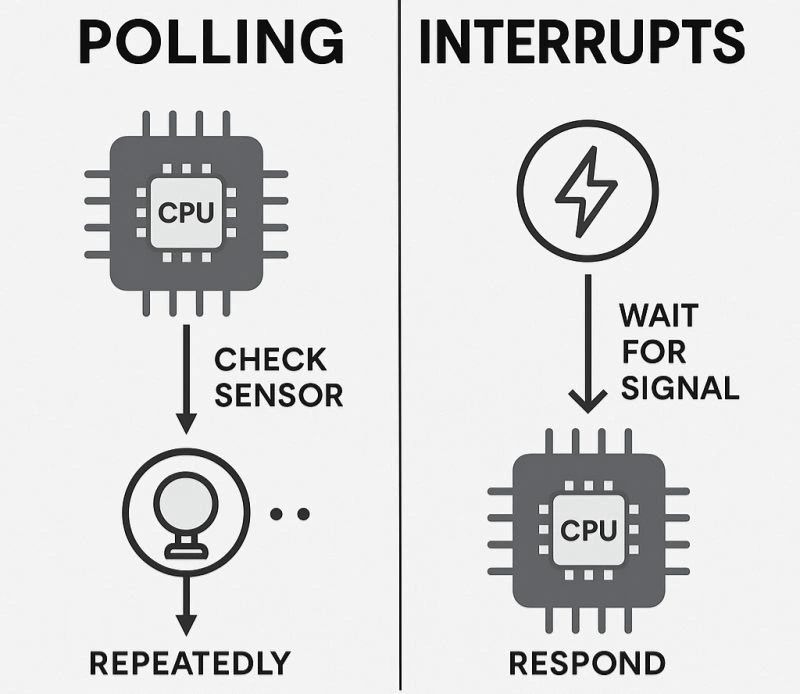
Figure 1: Polling wastes cycles checking for events, while Interrupts allow the CPU to stay efficient.
Exceptions vs. Interrupts
We clarified a common confusion: All Interrupts are Exceptions, but not all Exceptions are Interrupts.
- Exceptions: Any event that halts normal execution. This includes hardware faults (like dividing by zero) and system calls.
- Interrupts: A specific subset of exceptions triggered by external hardware events (like a timer expiring or a GPIO pin changing state).
Inside the Cortex-M0+: Operation Modes
The ARM Cortex-M0+ processor has two distinct modes of operation to maintain safety and structure:
- Thread Mode: This is where your normal application code (like
main()) runs. It typically uses the Process Stack Pointer (PSP). - Handler Mode: The CPU automatically switches to this mode when an exception or interrupt occurs. It always uses the Main Stack Pointer (MSP).
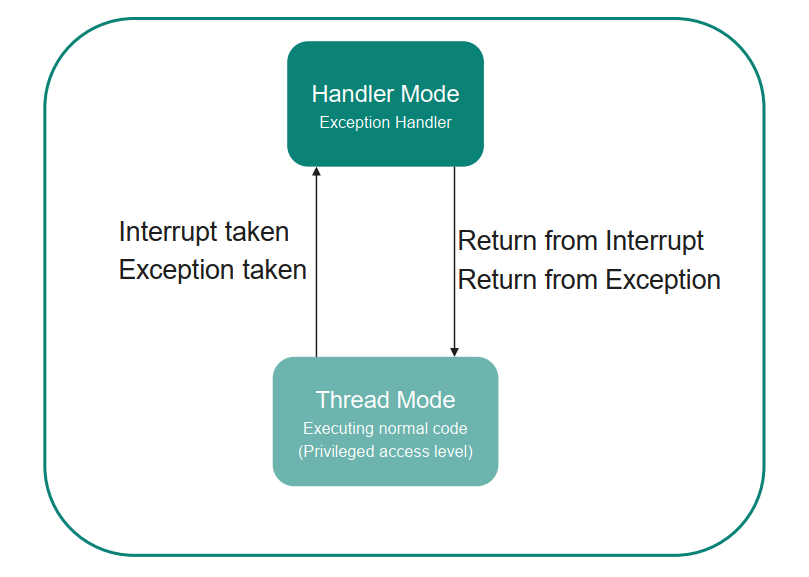
Figure 2: The processor switches context between Thread Mode (User Code) and Handler Mode (ISR).
Processor State and Special Registers
To handle interrupts correctly, the CPU needs a set of special registers. We explored the Register Bank:
- R0-R12: General purpose registers.
- R13 (SP): The Stack Pointer (Banked).
- R14 (LR): The Link Register (stores the return address).
- R15 (PC): The Program Counter.
But the real magic lies in the Special Registers:
- xPSR (Program Status Register): Holds status flags (Zero, Negative, etc.).
- PRIMASK: The "Master Switch" for interrupts. Setting the LSb to 1 disables all interrupts (except NMI and HardFault). This is the CPU Level of interrupt enabling.
- CONTROL: Determines which stack pointer (MSP or PSP) is used in Thread mode.
- IPSR (Interrupt Program Status Register): A part of xPSR that tells you which interrupt is currently executing.
The Brain: NVIC (Nested Vectored Interrupt Controller)
Managing multiple interrupts requires a dedicated controller. In Cortex-M processors, this is the NVIC. It is a powerful hardware unit that handles:
- Enabling/Disabling specific interrupts.
- Prioritizing interrupts (Nested capability).
- Pending status management.
The 3 Levels of Enabling Interrupts
For an interrupt to actually reach the CPU, it must be allowed at three distinct gates:
- Peripheral Level: The specific block (e.g., Timer or GPIO) must be configured to generate the interrupt signal.
- NVIC Level: The interrupt channel must be enabled in the NVIC.
- CPU Level: The global interrupt mask (
PRIMASK) must be cleared to allow interrupts to pass.
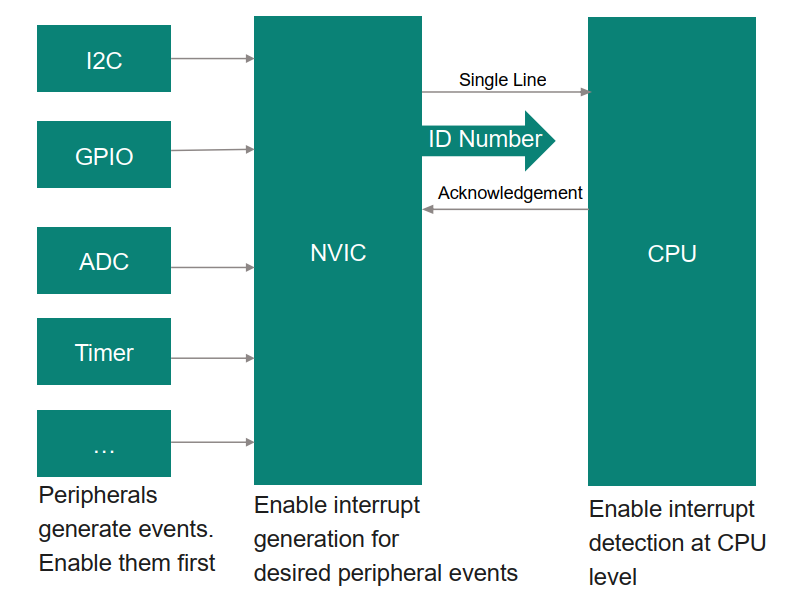
Figure 3: The three gates of interrupt activation. All must be open for the ISR to execute.
Controlling the NVIC: Registers
We dived into the memory-mapped registers of the NVIC (referencing the PSoC 4100S Plus Registers TRM).
- SETENA (Set Enable) -
0xE000E100: Writing a1to a specific bit enables that interrupt. Writing0has no effect. - CLRENA (Clear Enable) -
0xE000E180: Writing a1disables that interrupt. This "Write 1 to Clear" design avoids Read-Modify-Write errors.
We can also simulate interrupts using software!
- SETPEND -
0xE000E200: Writing1forces an interrupt into a "Pending" state, triggering the ISR immediately (if enabled). - CLRPEND -
0xE000E280: Clears a pending interrupt manually.
The 32-Bit Limit and the "Exception 16" Rule
A key architectural detail we learned is that these NVIC registers (like SETENA and CLRENA) are exactly 32 bits wide. Since each bit corresponds to a single interrupt line, one register can manage exactly 32 distinct interrupts (IRQ #0 to IRQ #31).
It is important to remember the distinction between an IRQ Number and an Exception Number:
- Exceptions 0–15: These are System Exceptions (like Reset, NMI, HardFault) and are not controlled by these registers.
- Exceptions 16+: These are the "External Interrupts" (IRQs).
- Bit 0 of
SETENAcontrols IRQ #0, which corresponds to Exception #16. - Bit 1 controls IRQ #1 (Exception #17), and so on.
- Bit 0 of
If a microcontroller has more than 32 interrupts, it would need a second set of registers (e.g., SETENA1), but our PSoC 4100S Plus fits its peripherals comfortably within this range.
Who Goes First? Interrupt Priorities
Finally, we looked at the IPR (Interrupt Priority Registers). Since the Cortex-M0+ supports multiple interrupts, we can assign them priorities (0, 1, 2, 3).
- Lower Number = Higher Priority. Priority 0 is the most urgent.
- If two interrupts happen at once, the one with lower priority value wins.
- If a higher priority interrupt comes while a lower one is running, the CPU Nests—it pauses the current ISR to handle the urgent one.
This deep dive into the hardware architecture has prepared us to write robust, responsive code in the upcoming sessions.
#Infineon #EmbeddedSystems #Cohort3 #Debugging #OpenOCD #Interrupts #NVIC #CortexM0Plus #BareMetal